
Manual / Show Control
OSC Transmitters
OSC Transmitters is composed of independent configurations for custom OSC messages, each pointing at a named destination and carrying its own message template and trigger. Per-destination TCP connections are independent – a stuck console doesn't stall messages to the audio engine. Messages leave from the interface set under General → Network Interface Assignment; each destination shows its Source Interface in Advanced network mode.
Where it lives
Configuration is under Output → OSC Transmitters. The section lists every configured transmitter, with controls to add, reorder, duplicate, save as template, and delete each one. The named OSC destinations they send to sit in the OSC Destinations section above it.
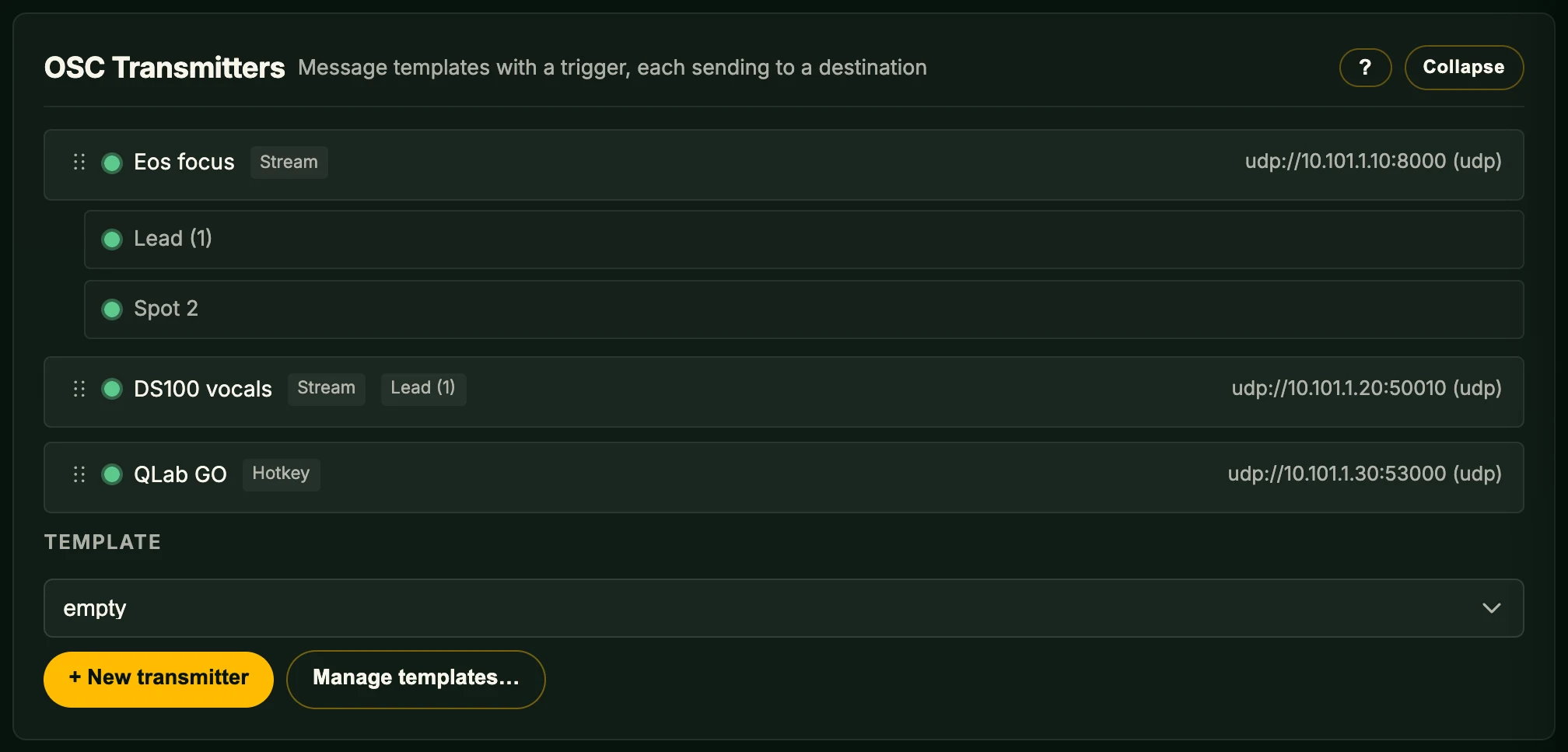
A transmitter points at an OSC destination, a named connection defined once and shared across transmitters and trigger zones. Set those up first, then build the transmitters that send to them.
Anatomy of a transmitter
Each transmitter carries:
| Field | Meaning |
|---|---|
| Name | Operator label. |
| Transmitter | Per-transmitter master toggle. A disabled transmitter does not send. |
| Default markers | The markers this transmitter sends for, as a list of marker IDs, controller aliases (cN), or all. The message sends once per resolved marker, and bare placeholders resolve against each in turn. Optional – see Default markers. |
| Default fader | The virtual fader index this transmitter's bare [fader] placeholder resolves against (including its transforms, e.g. [fader.int:0-127]). Optional; explicit [fader:N] ignores it. |
| Destination | The named OSC destination this transmitter sends to – its host, port, protocol, and framing. Shared across transmitters and trigger zones. |
| Trigger | When the message fires (Stream / Hotkey / Controller button / MIDI message / Fader on change). |
| Message | OSC address + arguments, with placeholders. |
The transmitter editor
Each transmitter collapses to a one-line summary, which carries a status indicator – see Why a transmitter can’t fire. Expand it to reveal four tabs:
| Tab | Contents |
|---|---|
| Basics | Transmitter toggle, Name, Default markers, Default fader, Destination. |
| Trigger | Trigger type, plus the type-specific fields (Rate (Hz), Send, Min change (m), key/button, edge, modifiers). |
| Settings | The OSC message editor with placeholder labels. |
| Diagnostics | Live status, Preview, and Test send. See Diagnostics. |
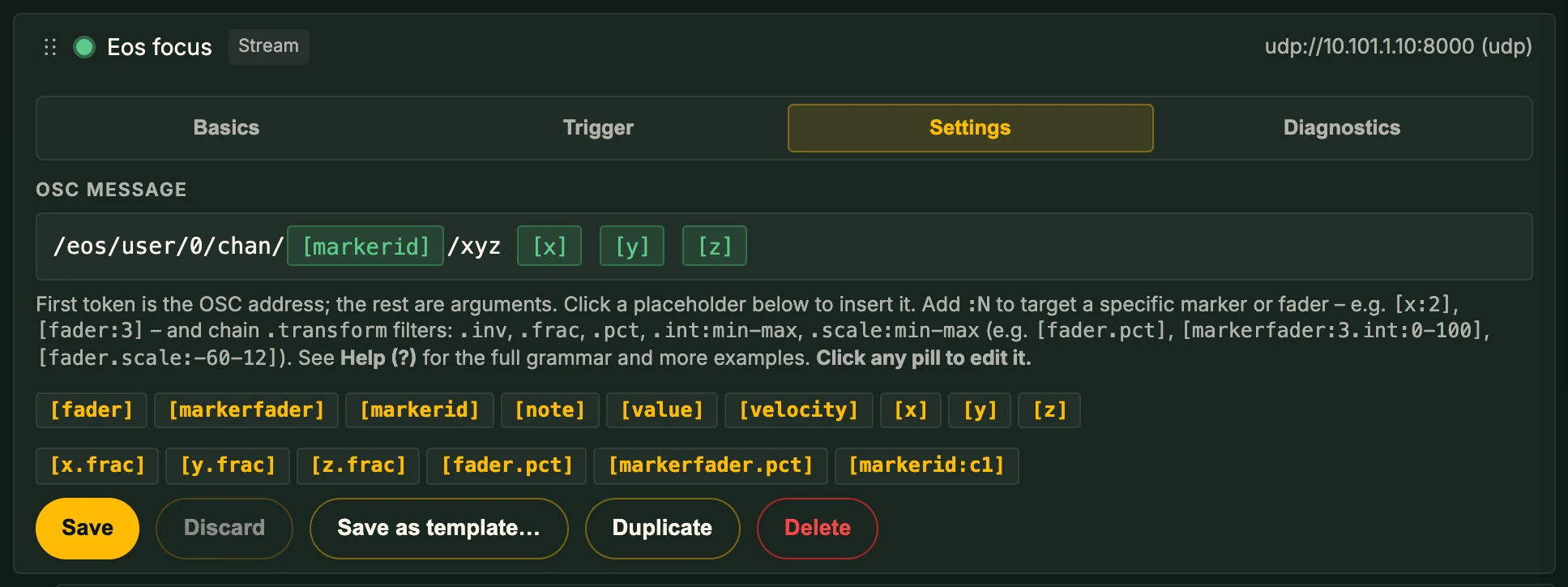
Each transmitter has the action buttons Save, Discard, Save as template…, Duplicate, and Delete, plus a drag handle on the collapsed row for reordering. Changes apply live but are lost on reload until saved.
Building your first transmitter
A worked example: stream marker 1's position to a media server at 192.168.1.50:7000 at 30 Hz.
- Open Output → OSC Transmitters, leave the Template dropdown on empty, and click + New transmitter. A collapsed transmitter appears at the bottom of the list.
- Expand the new transmitter. On the Basics tab, set:
- Name =
Media Server XYZ - Default markers =
1 - Destination = a destination pointing at
192.168.1.50:7000over UDP. Pick an existing one, or add it under OSC Destinations first.
- Name =
- On the Trigger tab, leave Trigger type = Stream, set Rate (Hz) = 30 Hz, Send = Send always.
- On the Settings tab, type the OSC message:
Placeholder names appear as labels as you type. The first whitespace-separated token is the OSC address; the rest are arguments./marker/[markerid]/xyz [x] [y] [z] - Switch Transmitter on (Basics tab). Click Save. Open the Diagnostics tab – Live status shows Healthy and a non-zero send rate.
Built-in templates
Five templates ship with OpenFollow, listed under Default Templates in the Template dropdown beside + New transmitter. Pick one, then click + New transmitter to create a transmitter pre-filled with the message and trigger:
| Template | Address + args | Recommended trigger |
|---|---|---|
| ETC Eos | /eos/user/0/chan/[markerid]/xyz [x] [y] [z] |
Stream @ 30 Hz |
| ETC Eos (User 99) | /eos/user/99/chan/[markerid]/xyz [x] [y] [z] |
Stream @ 30 Hz |
| ADM-OSC 2D | /adm/obj/[markerid]/xyz [x.frac] [y.frac] 0.0 |
Stream @ 30 Hz |
| ADM-OSC 3D | /adm/obj/[markerid]/xyz [x.frac] [y.frac] [z.frac] |
Stream @ 30 Hz |
| d&b absolute | /dbaudio1/coordinatemapping/source_position_xyz/1/[markerid] [x] [y] [z] |
Stream @ 30 Hz |
Both Eos templates send the marker position 1:1 in metres, on the same axes OpenFollow uses, and differ only in the user they address. ETC Eos addresses user 0, the background user ETC recommends for a continuous stream, which keeps it off the operator’s command line. ETC Eos (User 99) addresses user 99 instead – pick it when user 0 is in use on the console.
Triggers – when does the message fire?
Five trigger types are supported. Pick one per transmitter with Trigger type on the Trigger tab.
Stream
Continuous send at the configured Rate. The default for tracking-style outputs.
- Rate (Hz) is one of
1, 5, 10, 20, 30, 60Hz. - Send:
- Send always – fire every tick (default).
- Send only on change – fire only when a default marker has moved at least Min change (m) along any axis since the last send. A single distance threshold applies to all axes; per-axis thresholds aren't separately configurable.
The send only on change gate watches the transmitter's default markers. Even if the message body uses [x:3], the gate still tracks the defaults. Transmitters with no default markers fire on every tick.
Streaming with no live data (camera lost, marker not registered) skips silently – the transmitter's Diagnostics tab shows the skip reason under Recent events.
Hotkey
Fire on a key + modifier combination, on press or release edge.
- Key – any key in the polling set (alphanumerics, function keys, navigation keys).
- Modifiers – Ctrl / Shift / Alt / Cmd, in any combination.
- Edge – Press or Release.
A key already used by a keyboard action is outlined orange: one press does both.
Multiple OSC transmitters can listen on the same key – each fires independently.
The movement keys W A S D I J K L are reserved; assigning one is refused as colliding with the movement layout.
Example: Space press → fire /cue/12/start to QLab.
Controller button
Fire on a gamepad button edge.
- Button – A, B, X, Y, Left Bumper, Right Bumper, Start, Back, D-Pad Up/Down/Left/Right, etc.
- Edge – Press or Release.
As with hotkeys, the same button can drive multiple OSC transmitters; an orange outline marks a button also used by a gamepad action.
Example: gamepad BACK press → fire /eos/macro/901/fire.
MIDI message
Fire when a MIDI message matches the configured pattern. All match fields are wildcard-by-default – leave any field blank to match anything.
- Patch – the MIDI patch to match. Leave as (any) to match any patch.
- Type – Note On, Note Off, Control Change, Program Change, Key Pressure, or Channel Pressure.
- Channel (1 – 16, optional).
- Number – note number / CC number / program number (0 – 127, optional).
- Value (0 – 127, optional). For Note On with value 0, the message is treated as Note Off per MIDI spec.
Click Capture and play the control – the next incoming MIDI message (10-second window) fills the fields above. The matched event is exposed to the message via the [value], [velocity], and [note] placeholders – see Fader / event placeholders below.
Example: a console sends CC 7 on channel 1; the OSC transmitter maps it to a fader move on a media server.
Trigger:  MIDI Control Change ch 1 num 7
Address:  /media/master_volume
Args:     [value]
Fader on change
Fire when a fader's value changes, throttled at the configured rate. The source is a single combined Fader dropdown that lists both the eight virtual faders and the per-marker marker faders.
- Fader – pick a virtual fader (by display name / index) or a marker fader from the dropdown.
- Rate (Hz) – caps the send rate while the fader is moving. Same options as Stream. A sweeping MIDI fader or a moving gamepad-driven marker fader produces dozens of changes per second; the throttle keeps the wire output stable.
Combine with [fader] / [fader:N] / [markerfader] placeholders – optionally with an int / scale / pct transform – to send the raw value or a scaled one.
Trigger:  Fader on change, fader 1, rate 30 Hz
Address:  /spatial/source/1/distance
Args:     [fader]
The message: address, args, placeholders
Address vs arguments
The first whitespace-separated token in the message is the OSC address. Everything after it is an OSC argument. Arguments are tokenised quote-aware:
/cue/start "Cue 12" 1.0This sends two arguments – Cue 12 (string) and 1.0 (float) – not three. Single quotes work the same way. Unclosed quotes are rejected at save with a one-line error; the transmitter will not enable until the editor is balanced.
Trigger Zones read their per-event OSC fields the same way, so quoted arguments behave identically there.
Argument types
Argument types are inferred from the literal – there is no per-argument type selector:
- An integer literal (
12,-3) sends asi. - A float literal (
1.0,-0.5,3.14e-2) sends asf. - Anything else sends as a string (
s).
Placeholders carry their own typing: [markerid] sends as i; all position placeholders ([x], [y.frac], etc.) send as f.
Placeholder grammar
Every placeholder follows one grammar:
[source:index.transform]- source (required) – what to read: a position (
x/y/z),markerid, a fader (fader/markerfader), or a live MIDI event field (value/velocity/note). - :index (optional) – which marker or fader to read. A marker ID for
x/y/z/markerid/markerfader; a fader number forfader. Omit it to use the transmitter's Default markers / Default fader. Event sources take no index. An index can also name a controller (:cN) – see Following a controller. - .transform (optional, repeatable) – one or more
.-separated transforms applied left to right (see Transforms).
So [x] reads the default marker's X, [x:3] reads marker 3's X, and [x:3.frac.inv] reads marker 3's X, normalises it to the grid, then negates it. Anything that doesn't parse is sent as literal text.
Position & marker sources
| Source | Value | Wire type |
|---|---|---|
[x] [y] [z] | Marker position in metres (PSN coords: X = stage left, Y = upstage, Z = up). | f |
[markerid] | The resolved marker's ID. | i |
Position sources accept the inv and frac transforms – e.g. [x.frac] is the fractional X position and [x.inv] is −x. markerid takes no transform.
Targeting a specific marker or fader
By default a placeholder resolves against the transmitter's Default markers (or Default fader). Add :N to target one explicitly:
/cue [x:3] [y:3] [z:3]This builds a single OSC transmitter that reads from a marker other than its default – useful for cross-marker messages or transmitters that mix markers in one message. :N is a marker ID for position / markerid / markerfader sources, and a fader number for fader.
Placeholder labels in the editor are click-to-edit: clicking a label exposes the :N index so you can change the target without retyping.
Following a controller – :cN
Instead of a fixed marker ID, an index can name a controller: :cN (1-based, so c1 is the first controller) resolves to the marker that controller N is currently driving, re-evaluated live as the operator moves. Use it to tell a console which fixture an operator is following without hard-coding a marker ID.
/follow [markerid:c1] [x:c1] [y:c1] [z:c1]It works on the marker-keyed sources – markerid, markerfader, and x / y / z – and combines with transforms: [markerfader:c1.int:0-100] sends that controller's marker fader as 0–100. It is not valid on [fader] or the MIDI event sources, and c0 is not a controller – it is sent as literal text.
A :cN placeholder carries no Default markers dependency. With one controller connected, cN follows the currently selected marker; with several, it tracks that controller's marker. If controller N is disconnected or isn't driving a marker, the transmitter skips that send (counted under Diagnostics) rather than falling back to the default.
Transforms
A transform reshapes a source's value. Chain several with . – they apply left to right.
| Transform | Effect | Valid on |
|---|---|---|
inv | Reflect about the centre of the value's range: negates a position; maps a 0–1 fader to 1 − value. | positions, fader, markerfader |
frac | Normalise a position to [−1, 1] by the grid's extent (X by width, Y by depth, Z by maximum height). Out-of-grid positions saturate cleanly at +1 / −1. | positions |
pct | Multiply by 100 – a fader at 0.5 becomes 50.0. | fader, markerfader |
int:min-max | Scale a 0–1 fader into the inclusive integer range [min, max]. min may exceed max to invert. | fader, markerfader |
scale:min-max | Scale a 0–1 fader into the float range [min, max]. Bounds may be decimal (scale:-1-1, scale:-0.5-0.5). | fader, markerfader |
[z.frac] requires the grid's Maximum Height to be set; otherwise the transmitter skips with an unresolved-placeholder error. The inverted fractional position is [x.frac.inv].
int / scale use inclusive bounds: [fader.int:0-100] against a fader at 0.5 sends 50; at 1.0 sends 100. Inverting is just min > max – [fader.int:127-0] on a fader at 0.0 sends 127.
Fader & event sources
For OSC outputs driven by virtual faders, marker faders, or live MIDI events:
| Placeholder | Value | Wire type |
|---|---|---|
[fader] / [fader:N] |
Virtual fader value, normalised 0.0 – 1.0. Bare form uses the Default fader; :N picks fader N. |
f |
[fader.int:min-max] / [fader:N.int:min-max] |
Fader value scaled into an integer range (see Transforms). | i |
[markerfader] / [markerfader:N] |
Marker fader value, normalised 0.0 – 1.0. Bare form is the transmitter's own marker fader (marker-fader-driven transmitters only); :N reads marker N's. |
f |
[value] |
Live MIDI event value (0–127). Only valid in MIDI-driven transmitters. |
i |
[velocity] |
Note velocity (0–127). Only valid in Note On / Note Off transmitters. |
i |
[note] |
MIDI note number (0–127). Only valid in Note On / Note Off transmitters. |
i |
Fader and marker-fader sources also accept the inv, pct, and scale:min-max transforms – e.g. [fader.pct] sends a percentage and [fader.scale:-1-1] maps the fader across −1 … 1.
If a transmitter's trigger doesn't supply the data a placeholder needs (e.g., [velocity] in a Stream-triggered transmitter), the transmitter skips, and the reason appears under Recent events on the Diagnostics tab.
Default markers
The Default markers field sets which markers a transmitter sends for. It takes a comma-separated list, where each entry is one of:
- a marker ID (
1,2, …); - a controller alias (
c1,c2, …) – whatever marker that controller currently drives, re-evaluated live (see Following a controller); all– every marker this station controls, re-evaluated live as that set changes.
The transmitter sends its message once per resolved marker, each against that marker's own position. A Stream transmitter set to 1, 2, 3 therefore sends three messages per tick, and one set to all follows every marker the station drives without a separate row per performer. Bare placeholders ([x], [markerid]) resolve against each marker in turn; an explicit [x:N] still targets marker N regardless.
The field is optional. OpenFollow only resolves it when at least one slot in the message actually needs a marker, so a transmitter whose message is entirely literals or only explicit [x:N] targets sends even with it blank. The web editor enforces this at save:
- If the message uses
[x]/[y.frac]/[markerid]/ etc. and no default marker is set, the placeholder label turns red, the row reads No default marker, and the transmitter saves disabled until you either set a default or rewrite the placeholder to use the explicit-marker form. - A transmitter with all-literal or all-explicit placeholders saves with no default markers and runs.
An entry for a marker this station doesn't control is skipped and shown with a red indicator in the list below the row.
Marker ID 0 is preserved as a deliberate operator choice, distinct from "no default markers."
Per-transmitter tools
Discard
Reverts the transmitter to its last saved state. Scoped to that transmitter; other open transmitters keep their unsaved edits. Enabled only while there are unsaved changes; asks for confirmation.
Duplicate
Copies the transmitter and inserts the duplicate immediately below. Use it to make a near-clone (e.g., the same Eos template for a second marker) and edit the differences.
Reorder
Drag the transmitter's grip handle to reorder. Order is cosmetic – transmitters evaluate independently.
Save as template
Saves the transmitter's name and message as a reusable template. The button is disabled while the transmitter has unsaved changes – click Save first. See Saved templates below.
Saved templates
Two kinds of template appear in the Template dropdown:
- Default Templates – bundled with OpenFollow. Always present and can't be deleted.
- Custom Templates – operator-saved. Save as template… creates one.
Manage templates… opens the template chooser, where you apply, delete, Export, or Import a template. Export downloads one transmitter template as a single .oftemplate file to share or version-control; Import… loads a .oftemplate from another station into your user templates. A file authored by a newer OpenFollow than this build can read is rejected with an explanation, never applied half-way.
Diagnostics
Each transmitter's Diagnostics tab shows three panels:
- Live status – State (Healthy / Unhealthy), Send rate (/s), Last error, and Recent events: the last five sends and skips. Each entry shows its age and the rendered address and arguments, or for a skip the reason, typically an unresolved placeholder name with an actionable hint. The refresh button reloads it.
- Preview – Refresh renders the message against current marker data without sending.
- Test send – Send test packet sends one packet to the destination, even when the transmitter is disabled.
The Diagnostics tab is the first place to check when an output isn't reaching its destination – the skip reason almost always identifies the problem (no default marker, marker ID not registered, the grid max height not set for [z.frac], etc.). See Troubleshooting → OSC output isn't firing.
Why a transmitter can’t fire
A transmitter that can never send, whatever its trigger does, says so on its collapsed row. The indicator names every reason at once, in the order they need fixing, so you fix the lot in one pass instead of discovering the next one after each save:
| Row reads | Fix |
|---|---|
| No destination | No OSC destination is selected, or the one named has been deleted. Pick a destination on the Basics tab. |
| No controlled marker | The station controls no marker for a bare placeholder to resolve against. Add one under Markers & Zones → Marker Control & Visibility. |
| No default marker | The message uses a bare placeholder and Default markers is blank. |
| Markers 9, 12 not registered | The message targets marker IDs this station doesn’t control. Register them, or point the placeholders at markers it does. |
| Grid Maximum Height not set | The message uses [z.frac], which needs a non-zero Maximum Height under Camera & Grid → Grid to normalise into ±1. |
More than three faults at once show the first three and a count of the rest. A row with no faults shows Enabled or Disabled.
This covers faults that hold for the row itself. For a transmitter that is configured correctly but still isn’t reaching its destination, use the Diagnostics tab.
Multiple outputs: a typical wiring
Run as many OSC transmitters as you need; each is independent. A typical multi-system show:
- Transmitter 1 – Eos Augment3D, marker 1. Stream @ 30 Hz, ETC Eos template, UDP to the console.
- Transmitter 2 – d&b Soundscape, marker 1. Stream @ 60 Hz, d&b absolute template, UDP to the DS100.
- Transmitter 3 – QLab cue 12. Hotkey Space press,
/cue/12/start, UDP to QLab. - Transmitter 4 – Console macro. Controller button BACK press,
/eos/macro/901/fire, UDP to the console. - Transmitter 5 – Cross-marker message. Stream @ 10 Hz, custom address using
[x:1]/[x:2]in one message.
All five run from one OpenFollow instance.
Related chapters
- OSC Destinations – the named host / port / protocol / framing connections every transmitter sends to, plus TCP framing and reconnect behaviour.
- Hardware Inputs – configures the MIDI patches, virtual fader bus, and marker faders that drive the MIDI message / Fader on change triggers above.
- Output Protocols – overview of the four output protocols (PSN / OTP / RTTrPM / OSC).
- Zone Occupancy Detection – fires its own OSC messages on first / additional entry and partial / final exit transitions, using the same quoting rules and placeholders as OSC transmitters.
- Troubleshooting → OSC output isn't firing – diagnostic recipes when a transmitter doesn't reach its destination.