
Manual / Operating
Operator Messages
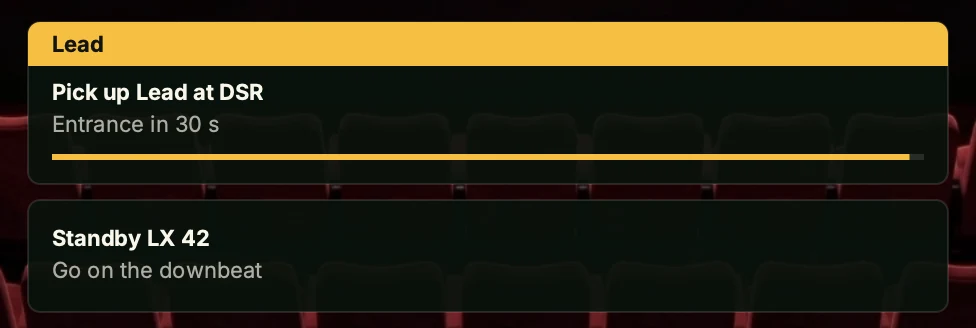
A station can show short text messages – typically the operator's next cue – as cards on the Operator Screen, pushed in over OSC by a console or show-control system. They use the same receiver as OSC Input, so OSC server (Listen for OSC messages) must be ticked for any message to arrive.
Configured in the web UI under Input → Operator Messages. Off by default.
Settings
- Operator messages – master toggle (Show messages on the Operator Screen). When off, incoming messages are ignored and nothing is drawn on the Operator Screen.
- Placement – where the stack of cards appears: Bottom-center or Top-center.
- Max visible – how many cards show at once, 1–20 (default 5). Anything beyond this collapses into a single +N more line so the overlay never overruns the screen.
- Routing – Only the marker's station (default): a message with a marker ID of 1 or higher shows only on the station controlling that marker. Every station: marker IDs are ignored and every message shows everywhere. A broadcast message always reaches every station.
- Scale – uniformly enlarges the cards and their text:
1×,1.25×,1.5×,1.75×, or2×(default1×). Card width is 60% of the screen, at most 460 px, so long lines wrap rather than overrun at the larger sizes.
Sending a message
Send to the /message address with up to four positional arguments (OSC type tags ssif). The OSC Dictionary carries the same reference alongside every other inbound OSC address:
/message <message> <info> <markerId> <seconds>| Argument | Type | Meaning |
|---|---|---|
| message | string | The main line of text. |
| info | string | Optional second line (e.g. a cue number). Defaults to empty. |
| markerId | integer | Routing target (see below). Defaults to 0. |
| seconds | float | Auto-dismiss after this many seconds. 0 keeps the card until it is cleared. Defaults to 0. |
Each text field is cut at 200 characters. Trailing arguments are optional and fill in left to right. The numbers are read leniently – markerId / seconds may arrive as a numeric string ("3", "8.0") or the other numeric type – but a numeric argument that can't be read at all drops the whole message.
Routing by marker
0– broadcast. Shown on every station. Broadcast cards have no title bar.1or higher – marker-routed. Shown only on the station currently controlling that marker; every other station drops it. The card gets a solid title bar in the marker's colour with the marker name on it.
This lets one sender address "whoever is on Marker 3" without knowing which physical station that is. Set Routing to Every station to ignore marker IDs and show every message on every station.
Replace and stack
A marker-routed message replaces the card already showing for that marker, so a marker never has more than one. Broadcast messages stack, newest first, each with its own timer. Cards beyond Max visible fold into +N more.
A timed card (seconds above 0) carries a countdown bar that shrinks to zero, then the card disappears. A card with 0 seconds has no bar and stays until cleared.
Clearing
/message/clear            clears all messages
/message/clear  <id>       clears messages for marker <id>
You can also bind a key or gamepad button under the Input tab to clear the messages on this station – see Gamepad, Keyboard & OSC.
Transport
Messages travel over the receiver configured in OSC Input – unicast straight to a station, subnet broadcast, or the Multicast group set there to reach every station at once.