
Manual / How To
Move a grandMA3 fader
A gamepad stick drives the marker fader in OpenFollow, and an OSC transmitter sends its value to an executor fader on grandMA3. The example below gives the operator zoom on the tracked moving lights: stick down is the narrowest zoom, stick up is the widest zoom.
grandMA3: receive OSC
Open Menu → In & Out → OSC. Full reference: grandMA3 Help – OSC.
- Set Interface to the network port that faces OpenFollow. Note its IP address.
- Tap Enable Input.
- Add a line: Mode
UDP, Port8001, Fader Range100, ReceiveYes. Leave Prefix empty and Page / Fader at their defaults.

grandMA3: two zoom executors
- Store the tracked moving lights at their narrowest zoom on any executor and leave it on.
- Store a second sequence with only the widest zoom on executor 201, page 1. This guide uses that executor as the example; any executor works, as long as its page and number are the same in the OSC message and the steps below. A page apart from the show’s playback pages keeps it out of the way; the OSC message names the page, so the fader moves whichever page is selected.
- Set the fader function of executor 201 to Temp. See grandMA3 Help – Assign Objects to an Executor and FaderTemp.
The Temp fader crossfades executor 201 in as it comes up, so the zoom moves from narrowest to widest.
OpenFollow: marker fader stick
Under Input → Gamepad, set Marker fader stick to Left Stick Y or Right Stick Y, whichever Move X/Y doesn’t use. Marker fader speed (s) sets the time for a full sweep. See Controls → Marker fader stick.
OpenFollow: OSC transmitter
- Under Output → OSC Destinations, add a destination: Host = the grandMA3 interface IP, Port =
8001, Protocol = UDP. - Under Output → OSC Transmitters, click + New transmitter.
- Basics tab: Name =
MA3, Default markers =1, Default fader = (none), Destination = the grandMA3 destination. Tick Send this transmitter’s messages. - Trigger tab: Trigger type = Fader on change, Fader = marker 1 under Marker faders, listed by its marker name, Rate (Hz) =
30. - Settings tab, OSC Message:
/Page1/Fader201 [markerfader.pct] - Click Save. Move the stick. Executor 201 follows.
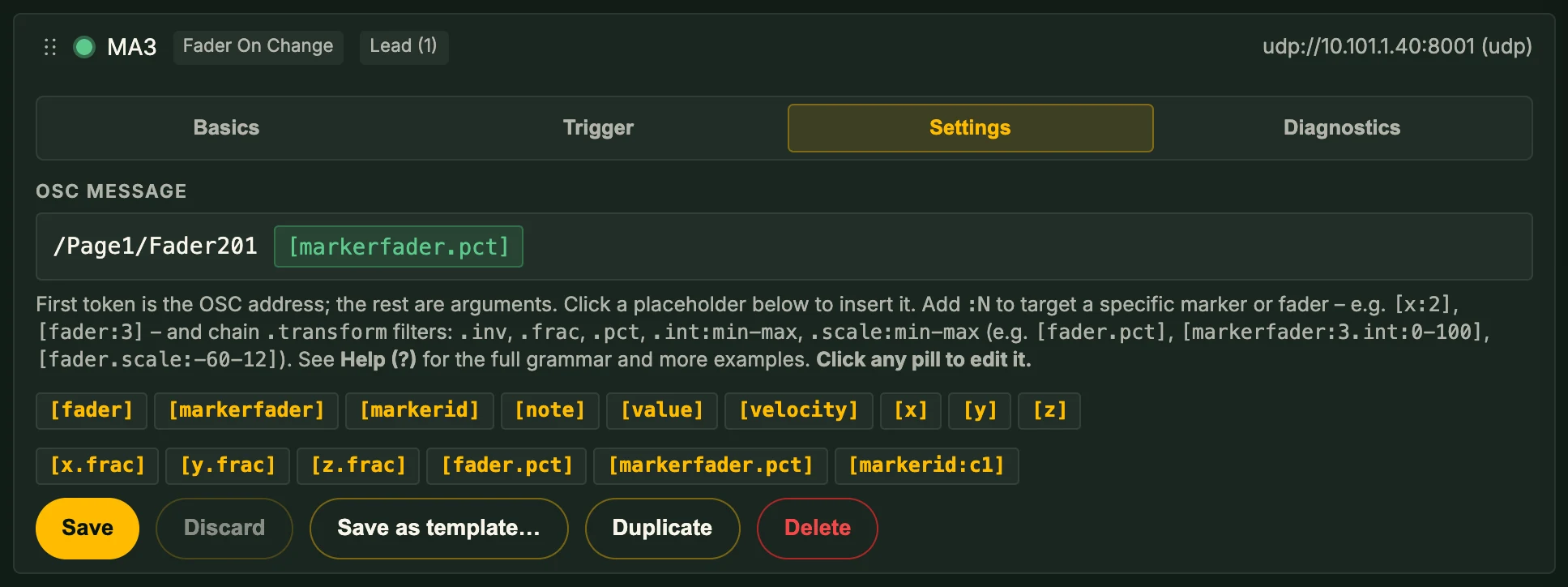
[markerfader.pct] sends the marker fader as 0–100, which matches Fader Range 100 on grandMA3.
Variations
- Other executor or page. Change the address:
/Page2/Fader305moves executor 305 on page 2. - Prefix set on grandMA3. Put it first:
/gma3/Page1/Fader201. - Other Fader Range. Scale to match, for example
[markerfader.int:0-255]for Fader Range255. - Reversed direction.
[markerfader.inv.pct]sends 100 with the stick down. - Several operators. One transmitter per marker, each with its own executor, or follow a controller instead of a marker with
[markerfader:c1.pct]. See Following a controller.
Troubleshooting
- Executor fader doesn’t move. Check the transmitter’s Diagnostics tab: Send test packet should light the Enable Input title bar on grandMA3 yellow. If it doesn’t, the destination IP, port, or the grandMA3 Interface is wrong. Set Echo Input to
Yesto see incoming messages in the System Monitor. - Fader moves, zoom doesn’t. The fader function of executor 201 isn’t Temp, or the narrow-zoom executor is off.
- Fader only reaches part of its travel. Fader Range on grandMA3 doesn’t match the value OpenFollow sends.
- Transmitter never fires. No Marker fader stick is set, or the marker isn’t controlled by a gamepad. The Operator Screen shows
Fand the fader value when the stick is active.