
Manual / Help
Status & Diagnostics
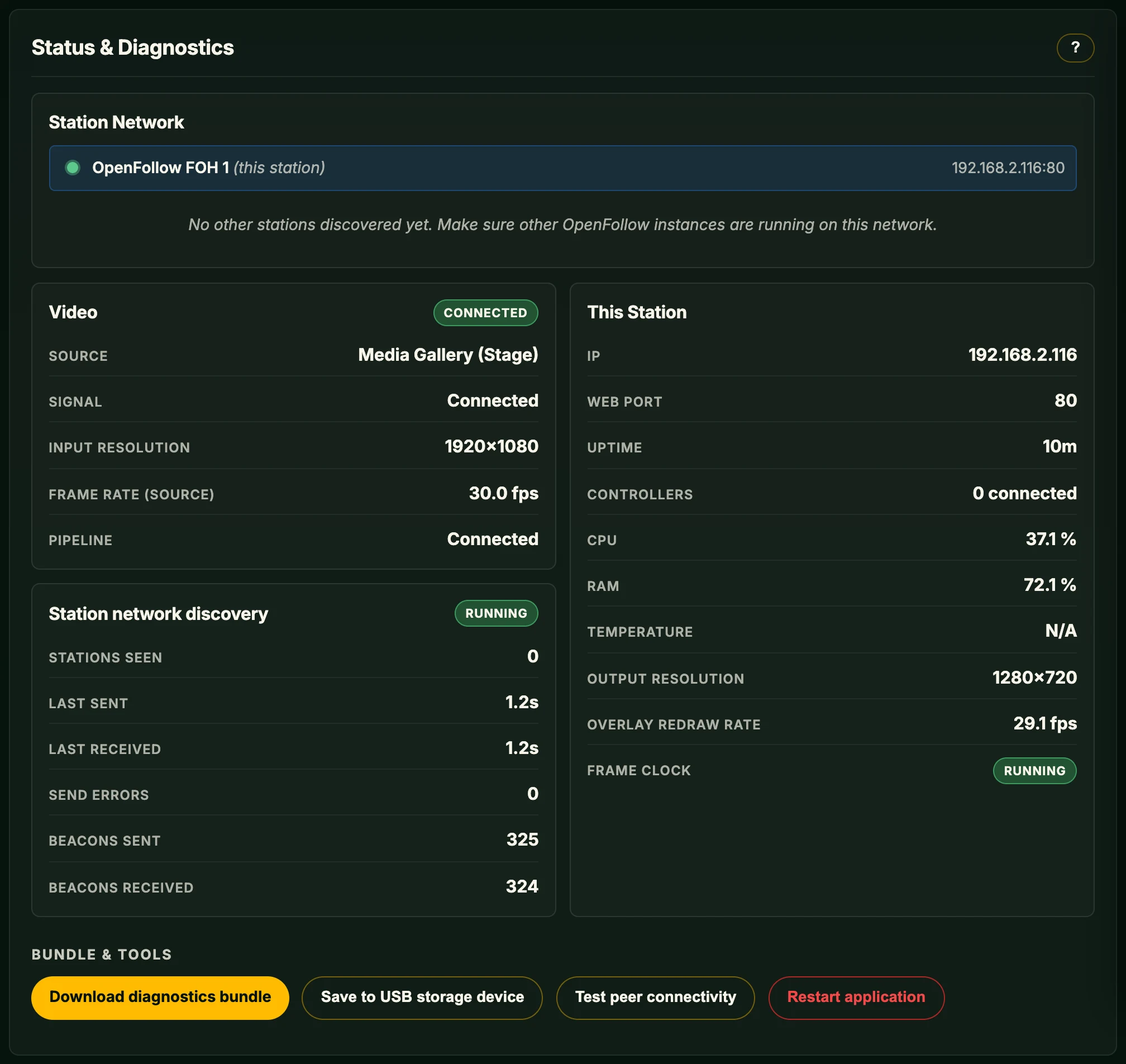
Status & Diagnostics is the Overview tab: how this station is doing right now, and the file for a support report. The boxes refresh every second while in view, the station list every 5 seconds.
Power warnings
A red box means the Pi is short of power or slowed down now: under voltage (freezes, USB dropouts) or CPU throttled (too hot). An orange box means it happened since the last start and stays until restart.
Station Network
Every OpenFollow station discovered on the LAN, this one and the others.
- Status indicator – green dot: online. Red ring: seen before, not reachable now.
- Station name – set under General → Station Settings. This station's row is blue and labelled (this station).
- Address – IP address and web port. Clicking another station's row opens its web interface in a new window; an offline station opens at its last known address.
Discovery does not cross router hops or VLAN boundaries.
Video
The active source. When it fails, a red box says what the station saw and what to try.
- Source – the configured source.
- Signal – Connected with a live feed, otherwise the failure the box names.
- Input resolution / Frame Rate (source) – what the source delivers or advertises; N/A until it connects.
- Pipeline – Connecting, Reconnecting, Connected, or Disconnected once retries have run out.
A red box also appears when arriving video is over Full HD or 30 fps. It keeps playing, but the picture or markers may lag.
This Station
- IP – the address this station is reachable on.
- Web port – the port the web interface is served on, the one other stations are told. Fallback means the configured port was taken and a backup port (8080 or 2010) is used.
- Uptime – how long the OpenFollow process has been running.
- Controllers – gamepads and 3D mice connected, and how many are missing; a red box names each missing one.
- CPU / RAM – load in percent. CPU above roughly 80–90 % can cause frame drops or tracking lag.
- Temperature – in °C. Above 80 °C may throttle the Pi.
- Output resolution – the canvas the overlay is drawn on. A different aspect ratio than the input resolution puts the overlay off the video.
- Overlay redraw rate – Operator Screen pictures per second. 0.0 fps with no screen is normal.
- Frame clock – Running is normal. Stalled (no run for over a second) freezes marker positions, input and detection while PSN, OTP, RTTrPM and OSC keep sending the last known position. See Troubleshooting → Positions frozen.
Station network discovery
Each station sends a beacon and listens for the others'. The label shows the worse of the two: Running; orange Send errors; red Sender stopped (other stations do not see this one), Receiver stopped (this station does not see the others) or Stopped (both).
- Stations seen – other OpenFollow stations currently known on the network.
- Last sent / Last received – the most recent beacon out and in.
- Send errors – beacons in a row that could not be sent; back to 0 once one goes out.
- Beacons sent / Beacons received – since the process started.
Person Detection
Shown while the Person detection feature is on. The label: green Running, blue Idle (enabled, waiting, for example for video), red Unavailable (packages missing, named in a red box), grey Off.
- Tracked People – people currently tracked.
- Inference (avg) – milliseconds per detection pass. Higher means more load.
- Inference Rate – detection passes per second.
- Detections (last) – boxes from the last pass, before tracking or smoothing.
Bundle & tools
- Download diagnostics bundle – one plain-text file of this station's state.
- Save to USB storage device – the same file, written to the top level of a USB stick or SD card reader on this station. A device that can't be written stays in the list, unavailable, with the reason. A file already on the device is never overwritten. A device the station mounted itself is unmounted again before the save reports success. One save runs at a time.
- Test peer connectivity – probes every known station and shows a table: green with a round-trip time when it responded, red with a reason when it was unreachable. Non-private destination IPs are refused (non-private IP refused); see Networking & Security.
- Restart application – restarts the OpenFollow process, not the operating system, after a confirmation. The page reloads once the station is back. Refused while a software update is running.
Export Diagnostics File for Support
On the station: Settings → Export Diagnostics File for Support in the Operator Screen's Settings menu. Choose a USB storage device and confirm. Esc or the controller's B button leaves the screen while the export continues; the result then shows in the status corner.
The bundle
Named ofdiag-<station>-<UTC date and time>.txt. The station keeps its ten newest. A header gives version, platform, time, host and the redactions applied, followed by the sections below. A section that fails on a degraded host reads [unavailable: …] instead of stopping the bundle. Collection has an overall time limit; sections not reached are listed as skipped.
| Section | Contents |
|---|---|
| A. Service / port | Configured and actual web port, process uptime, PID, restart count. |
| A2. OSC multicast group status | OSC listener port and multicast group, whether the join succeeded and on which interface. |
| A3. Runtime state | Video, frame loop, detection and controllers as the Overview shows them. |
| A4. Uplink status | Whether the station has internet, from its own time-sync and update-check attempts. |
| A5. Video source reachability | Whether the host the video input points at can be reached from this station. |
| A6. Network bind map | Network mode, the interface each function is pinned to, and what each holds now. |
| B. Discovery / peers | Beacon sender and receiver health, known stations. |
| C. Effective config | The saved configuration with credentials redacted, and a diff against defaults. |
| D. Recent failures | Last log lines (up to 2000), warnings and above from the past 24 hours, recent error reports, and a kernel log extract. |
| E1. Runtime / versions | Python, OpenFollow, GTK 3 and key dependency versions. |
| E1b. Video capability | Which video inputs this station can offer, and why not when one is unavailable. |
| E2. Person detection stack | Whether the optional detection packages are installed and which engine is selected. |
| E3. Operating system / E4. CPU / E5. Memory + disk | Distribution, kernel, CPU model, RAM, mount points, free space. |
| E5b. Storage breakdown | Per-filesystem fill and inode use, largest directories. |
| E5c. Settings backups | Backup archives by name and size, never their contents. |
| E6. System health | Throttling state, under-voltage flags, thermal events. |
| E7. Network interfaces | Interfaces with addresses, MTU, link state. |
| E8. USB devices | USB device table with an OpenFollow column classifying each device as MIDI, gamepad, camera or unclaimed. |
| E9. Gamepad controllers | Per connected pad: input mode, name, GUID, axis/button/hat counts, and calibration match or MISMATCH against the stored mapping. MISMATCH means the wizard ran on a different unit or controller mode; re-run the button detection wizard. |
| E10. 3D Mouse | Every attached 3D mouse and why one is not in use. |
| F. Recent I/O activity | Recent OSC sends and MIDI received. |
| G. Device permissions | Which device operations run without a password, which prompt, and which are unavailable. |
Redacted
Always, with no toggle: the web PIN, RTSP user name and password, the SRT passphrase, and credentials inside URLs and log lines. Everything else (IPs, hostnames, paths, USB descriptors) is included as is; review before sharing publicly.
Filing a useful bug report
Attach a fresh bundle. If reproducible, include the steps from a clean state. See the checklist in Troubleshooting.