
Manual / Help
PSNView
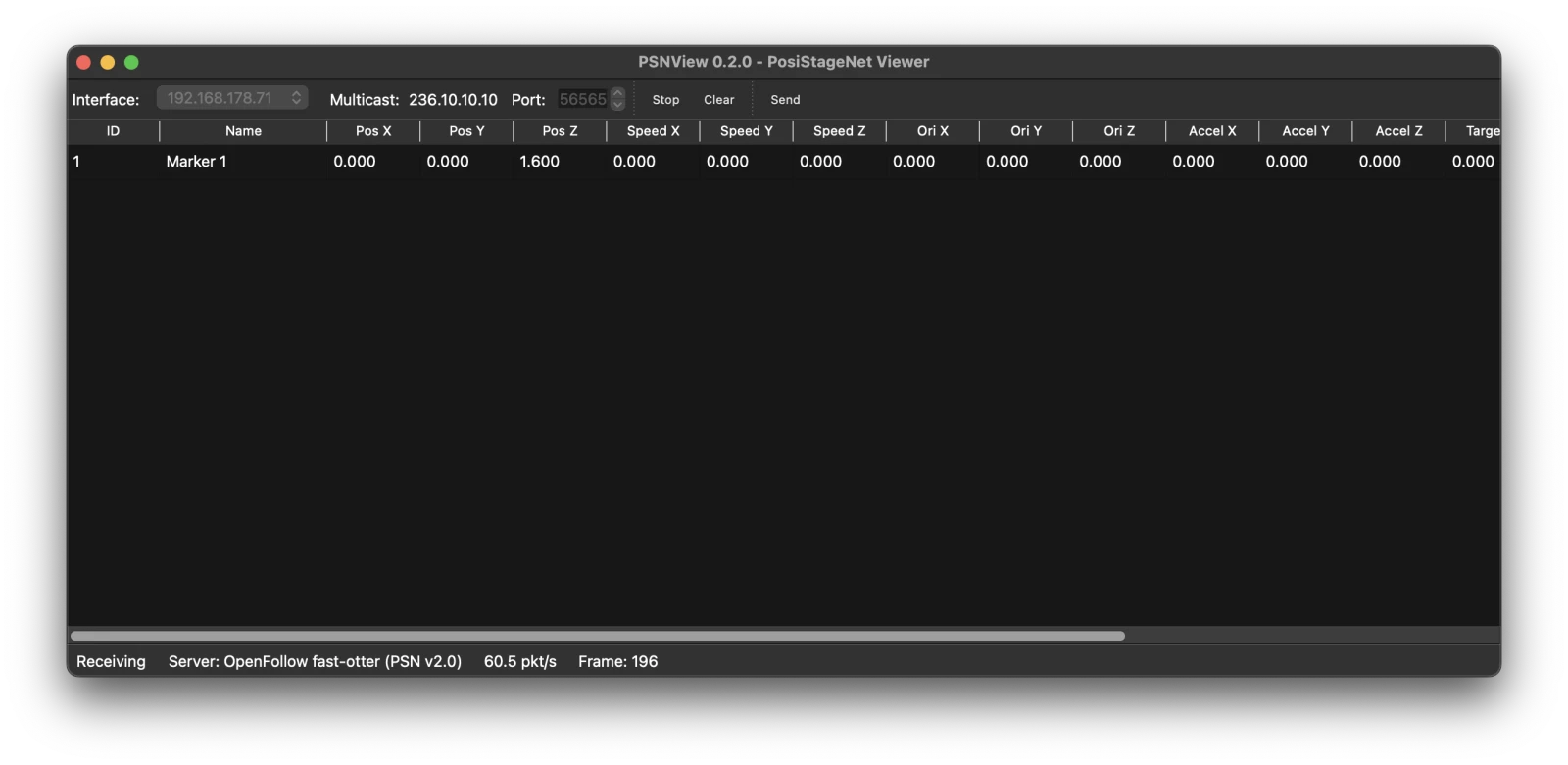
PSNView is a free desktop viewer for PSN by the OpenFollow project. It shows every tracker on the network with its position, speed and status, so you can check what a station sends without a console. It also sends test trackers to any PSN receiver.
Install
Download the build for your computer from github.com/openfollowapp/psnview/releases.
| Platform | File | How to run |
|---|---|---|
| macOS (Apple Silicon) | PSNView-<version>-macos-arm64.dmg | Open the DMG and drag PSNView into Applications. |
| Windows | PSNView-<version>-windows-x64.exe | Run the file. No installer. |
| Linux | PSNView-<version>-linux-x64.tar.gz | Extract and run PSNView (X11 or XWayland). |
- macOS asks for Local Network access on first launch. Allow it, or PSNView receives nothing.
- Windows warns on first launch because the build is unsigned.
- Windows and Linux take a few seconds to open the window.
View a station’s PSN
- Connect the computer to the same subnet as the station.
- Pick the network Interface that reaches the station.
0.0.0.0listens on every interface and is usually right. - Leave Port at
56565. PSNView listens on multicast group236.10.10.10, OpenFollow’s default. - Press Start. Each marker the station controls appears as one row.
Clear empties the table; trackers still on the wire come back with their next packet.
Reading the table
| Column | From an OpenFollow station |
|---|---|
| ID | Marker ID. |
| Name | Marker name from the marker catalog. |
| Pos X / Y / Z | Position in metres from the Reference Point. |
| Speed X / Y / Z | Velocity in m/s; 0 while the marker stands still. |
| Ori, Accel, Target | Always 0. |
| Status | Tracker status, 0.0 to 1.0 – see Output Protocols → Tracker Status. |
| Timestamp | The station’s own clock in microseconds. |
| Age (s) | Seconds since PSNView last received this tracker. |
A row turns gray after 2 seconds without data. The status bar shows Receiving or Listening (no data), the sending station’s name, the packet rate and the current frame. A station sends about 60 packets per second.
When something is missing
- Listening (no data) on
0.0.0.0: pick the interface on the station’s subnet explicitly. A computer with Wi-Fi and Ethernet often listens on the wrong one. - Rows appear, but the console still sees nothing: the station is sending; the problem is between the switch and the console. See PSN not received by the console.
- A row turns gray: that marker’s PSN stopped arriving. The station stopped, lost its network, or no longer controls the marker.
- Rows update but Status reads 0.0: the station still sends but has stopped moving its markers – see The stream is live but nothing moves.
Send test trackers
Send in the toolbar opens a PSN transmitter. Use it to test a console’s PSN input before an OpenFollow station is on the network.
- Pick the Interface to send from. A LAN interface reaches other receivers;
127.0.0.1reaches PSNView on the same computer. - Set a System name; receivers show it as the server name.
- Edit the trackers in the table, or use Add tracker and Remove tracker. PSNView sends up to 13 trackers. Leave Timestamp blank to send the time since the transmitter started.
- Send once sends one packet. Start streams at the Rate (Hz) you set, up to 60 Hz.
- Animate moves the positions while streaming: Sine circles in the XY plane, Ramp sweeps along X, by Amplitude (m) over Period (s).
Do not send tracker IDs that an OpenFollow station on the same network also sends: the console then receives two positions for one tracker.
Source and issues
PSNView is free software under the AGPL-3.0. Source code and issue reports: github.com/openfollowapp/psnview.